Turn AI-Generated Certificate Images Into Editable Canva Designs & Sellable Digital Products
Learn how to take the certificate images you create with AI, upload them into Canva Pro, use Canva’s layer separation & editing features, customize the design, and package your certificates into products you can sell on Etsy, Gumroad, TPT, PLR stores, and other marketplaces.

Turn Your AI Certificate Into A Canva-Ready Product
Generate the certificate image inside ChatGPT, then bring it into Canva to organize, edit, duplicate, and prepare it for customers or product delivery. You can also create multiple certificate files in bulk with different names and achievements in around 30 seconds.
Create In ChatGPT
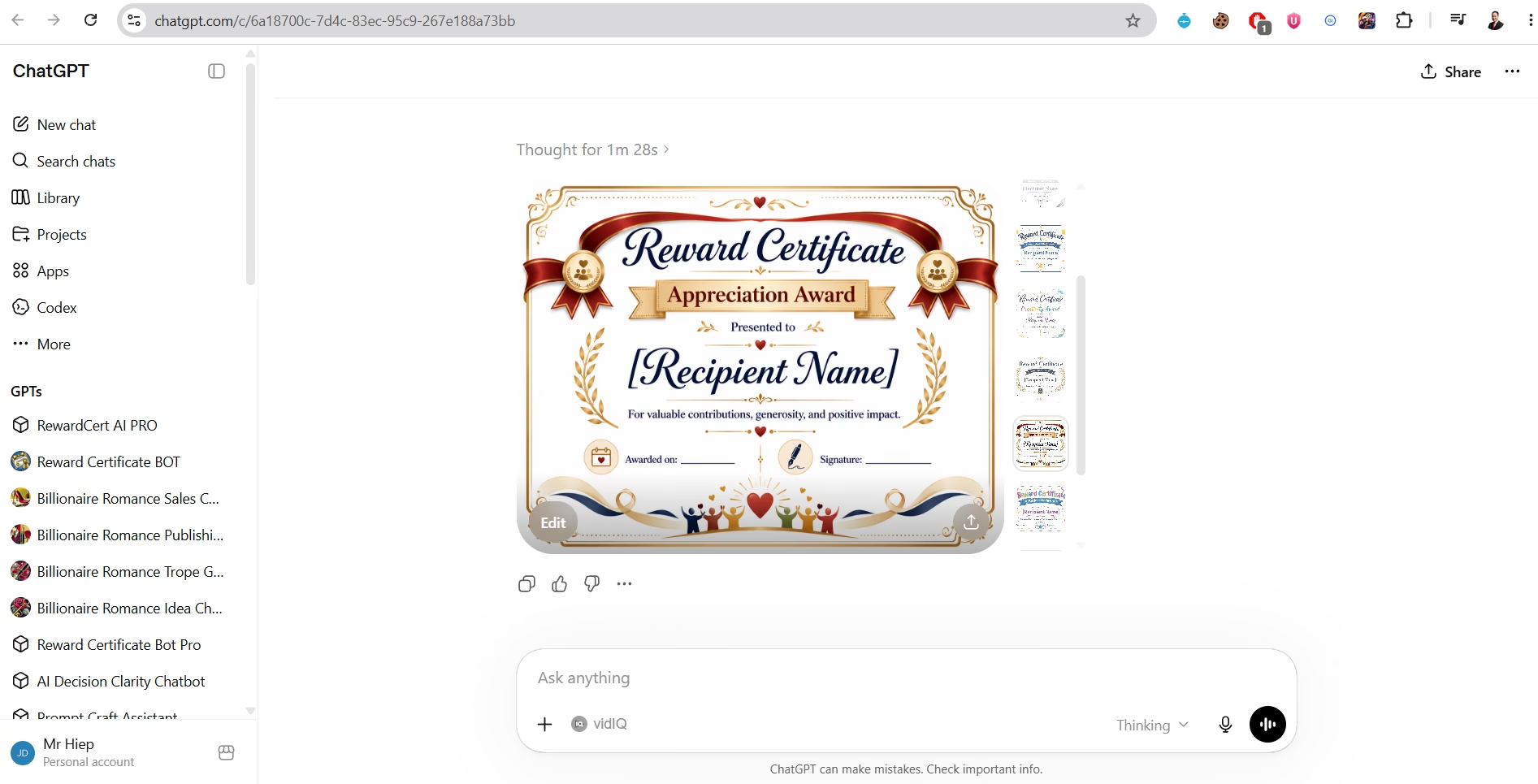
Start with RewardCert AI. Use the chatbot to generate a polished certificate image with names, award type, layout, decoration, and print-ready style.
Prepare In Canva
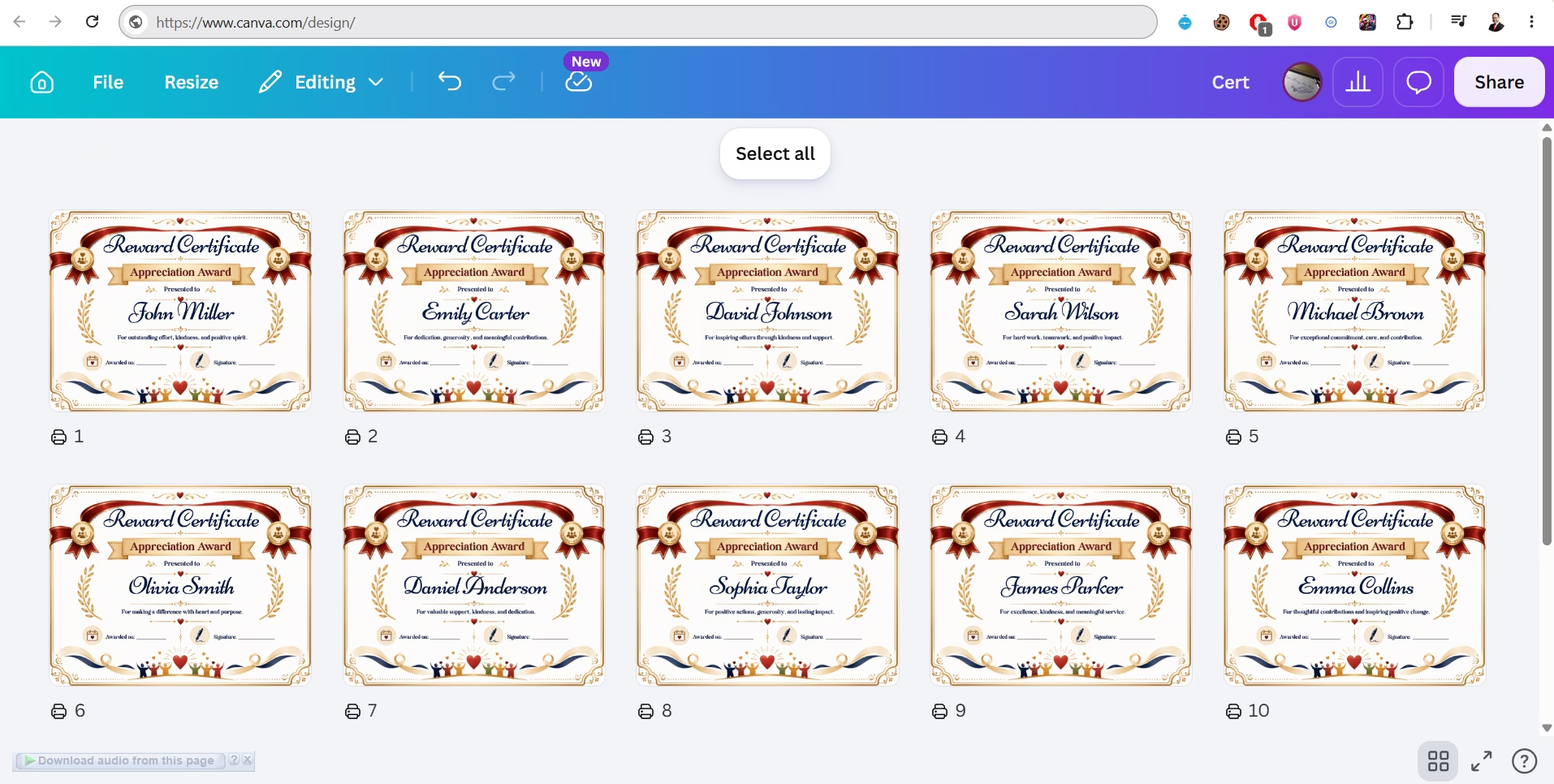
Finish inside Canva. Upload the image, duplicate designs, organize certificate pages, edit with Canva tools, and prepare a clean product for selling or delivery.
Bulk Certificate Creation In Around 30 Seconds
Create many certificate files at once with different recipient names, award titles, achievements, or custom text — perfect for teachers, coaches, schools, teams, events, Etsy sellers, and PLR product creators.
Simple Workflow. Professional Result.
This shows buyers how to move from a generated AI certificate into a practical Canva workflow they can use for printable products, client work, Etsy listings, or PLR-style bundles.
You already have RewardCert AI. You generated a beautiful image. Now what?
You can already create beautiful certificate prompts faster with the guided chatbot. You may also have RewardCert AI Pro, which unlocks 28+ more certificate types.
But after the prompt, after the AI image is generated, one important question remains:
“What do you do next?”
- ?How do you edit the certificate?
- ?How do you customize the name, title, message, date, signature, colors, fonts?
- ?How do you turn that flat image into something flexible and polished?
- ?How do you package it as a digital product for Etsy, Gumroad, TPT, or PLR stores?
Creating the image is only the beginning.
If you want to sell certificate products, you need more than one flat image. Many people get stuck here.
Can’t Edit The Image
The AI image is flat. You can’t change the name, message, fonts, or colors.
No Variations
You have one design — but no way to spin it into multiple versions for different niches.
No Product Files
You don’t know how to prepare PDF, PNG, JPG, Canva template links, license, or buyer files.
No Preview Images
You don’t know how to create marketplace-ready product previews.
No Listing Copy
You don’t know how to write Etsy/Gumroad/TPT titles, descriptions, and bullets.
Stuck Before Selling
You end up with a nice image — but no clear product to actually sell.
The certificate image is useful. But the real opportunity comes when you know how to edit it, package it, and sell it.
RewardCert AI Canva Seller Kit OTO 4
A practical training and seller kit that shows you how to edit AI-generated certificate images in Canva Pro and turn them into digital products.
You will learn how to:
- ✓Upload your AI-generated certificate image into Canva Pro
- ✓Use Canva Pro’s layer separation & editing features
- ✓Customize text, names, titles, messages, dates, signatures
- ✓Adjust fonts, colors, borders, seals, badges, and layout
- ✓Create different versions of one design for different audiences
- ✓Build niche certificate bundles
- ✓Export printable files & create Canva template links
- ✓Package your product professionally with previews, license, & instructions
- ✓Prepare listing copy for Etsy, Gumroad, TPT, Payhip, & PLR stores
- ✓Deliver the product to your customers cleanly
This helps you go beyond simply creating certificates. It helps you turn certificates into products.
From certificate prompt → certificate product.
Create Your Certificate Image With AI
Use RewardCert AI or Pro to craft a detailed prompt. Paste it into your AI image generator. Download the final image.
Upload Into Canva Pro
Bring your AI image into Canva Pro. Set up your design page in the correct size. The image becomes the foundation for your editable design.
Use Canva Pro Layer Editing
Use Canva Pro’s image editing & layer separation features to break the flat image into editable design elements.
Customize The Certificate
Edit title, recipient name, message, date, issuer, signature, fonts, colors, borders, badges, and seals — for any audience or occasion.
Create Product Variations
Turn one design into a Teacher pack, Graduation bundle, Sports pack, PLR product, Etsy printable bundle, and more.
Package The Product
Export PDF, PNG, JPG, Canva template links, instruction files, license files, and ZIP folders — ready for buyers.
Sell It Online
Use the seller kit to prepare titles, descriptions, bullets, previews, and listings for Etsy, Gumroad, TPT, Payhip, PLR stores, & more.
Built for sellers, creators, and digital product builders.
RewardCert AI Buyers
If you already create certificate prompts, this kit shows you what to do with the resulting images.
RewardCert AI Pro Buyers
Apply the workflow to all 28+ Pro certificate categories — not just Reward Certs.
Etsy & Gumroad Sellers
Turn certificate designs into editable Canva templates or printable digital downloads.
TPT Teachers
Build classroom certificate resources, reward packs, and student recognition bundles.
PLR & Bonus Creators
Package certificate bundles as PLR products, launch bonuses, or affiliate gifts.
KDP & Printable Sellers
Add certificate printables to your low-content book or printable product line.
Coaches & Course Creators
Create branded course completion certificates for your students and clients.
Small Business Owners
Make customer appreciation, employee recognition, and event certs for your business.
8 modules that take you from AI image to sellable product.
AI Certificate → Canva Pro Workflow
How to take the certificate image from your RewardCert AI prompt and bring it into Canva Pro for editing and customization.
Canva Pro Layer Editing Guide
How to use Canva Pro’s layer separation & editing features to turn a flat AI image into an editable design.
Certificate Customization System
How to customize title, recipient name, message, date, signature, issuer, colors, fonts, borders, badges, seals, and layout.
Certificate Variation Method
How to turn one design into multiple versions for different niches, audiences, occasions, and product angles.
Certificate Product Packaging Guide
How to package your product: PDF files, PNG/JPG previews, Canva template links, instructions, license files, ZIP folders.
Etsy & Marketplace Seller Kit
Title templates, description templates, bullets, keyword ideas, preview ideas, pricing, and delivery structure for Etsy, Gumroad, Payhip, TPT, & PLR stores.
PLR & Commercial Use Packaging Guide
How to prepare certificate products for personal use, commercial use, PLR offers, bonus packs, and digital bundles.
Product Delivery Checklist
A simple checklist to make sure your product is packaged cleanly before you send buyers to the download page.
Image generator vs. product seller.
⚠️ Before The Canva Seller Kit
- ✗You create a certificate image but don’t know how to edit it
- ✗You’re stuck with one flat AI-generated design
- ✗You don’t know how to customize it in Canva Pro
- ✗You can’t create product variations
- ✗You don’t know how to package the files
- ✗You don’t know how to write listing copy or product previews
- ✗You stop at the image and never turn it into something sellable
✅ After The Canva Seller Kit
- ✓You know how to bring AI certificate images into Canva Pro
- ✓You can use Canva Pro’s layer & editing features
- ✓You can customize text, fonts, colors, and design elements
- ✓You can create multiple product variations from one design
- ✓You can package files professionally with previews & license
- ✓You can create Canva template links & printable files
- ✓You can prepare listing copy & turn designs into sellable products
5 seller-focused bonuses included free.
Etsy Certificate Listing Templates
Ready-to-use listing templates: product titles, feature bullets, descriptions, and buyer-focused wording.
Certificate Product Naming Ideas
Naming ideas for certificate packs, bundles, printable products, Canva templates, PLR packs, and niche offers.
Product Packaging Checklist
A simple checklist that helps you prepare your files before selling or delivering your product.
Buyer Instruction Template
Give your customers a simple instruction file that explains how to open, edit, print, or use the product.
License Template For Certificate Products
Use the included license wording as a starting point for personal use, commercial use, or PLR-style products.
$502 worth of training, kit, & bonuses.
Today’s one-time OTO 4 upgrade price is a fraction of the total — for RewardCert AI customers.
| Item | Value |
|---|---|
| AI Certificate → Canva Pro Workflow | $47 |
| Canva Pro Layer Editing Guide | $67 |
| Certificate Customization System | $47 |
| Certificate Variation Method | $37 |
| Certificate Product Packaging Guide | $47 |
| Etsy & Marketplace Seller Kit | $47 |
| PLR & Commercial Use Packaging Guide | $37 |
| Product Delivery Checklist | $27 |
| Bonus 1: Etsy Listing Templates | $37 |
| Bonus 2: Product Naming Ideas | $27 |
| Bonus 3: Packaging Checklist | $27 |
| Bonus 4: Buyer Instruction Template | $27 |
| Bonus 5: License Template | $27 |
| Total Value | $502 |
Add The Canva Seller Kit To Your Order Today
Use it to upload AI certificate images into Canva Pro • use layer editing • customize text & design • create variations • package PDF/PNG/JPG/template files • build delivery folders • write marketplace listings • sell certificate designs as digital products.
The missing step between creating certificate images and selling certificate products.
One-time upgrade • RewardCert AI customers only • Lifetime access
14-Day Money Back Guarantee
Try RewardCert AI Canva Seller Kit for 14 days. If you feel this kit does not help you understand how to edit, customize, package, or prepare AI-generated certificate images for selling, simply contact us for a full refund.
You have nothing to lose — and a complete certificate selling workflow to gain.
Don’t stop after creating a certificate image.
Turn that image into something editable. Something customizable. Something packaged. Something buyers can use. Something you can sell.
Edit it. Customize it. Package it. Sell it on Etsy, Gumroad, TPT, PLR stores, and more.
P.S. RewardCert AI helps you create certificate prompts. AI helps you generate the certificate images. RewardCert AI Canva Seller Kit helps you edit those images in Canva Pro and turn them into products.
This is the final step — the one that takes you from creation to selling. If you want to customize, package, and sell your certificate designs more professionally, add RewardCert AI Canva Seller Kit to your order now.